Project Settings
Project Settings are the settings that apply to every Migration inside a Project. Configure them once per Project.
Where to find Project Settings
Open a Project, then click Project Settings in the left sidebar.
Note: Project Settings is only accessible from the Project view. If you are inside a Migration, go back to the Project first.
External ID Pattern

Read-only. This is the pattern SuiteMigration uses to build the External ID for records pushed to NetSuite. The External ID uniquely identifies a record in NetSuite.
Format:
Example: 9341455942200204__290__xWrhwf9W2x1L
You do not need to change anything here. It is shown for reference so you know what to expect on NetSuite.
Concurrency and Batch Size

Concurrent Workers
Controls how many records SuiteMigration pushes to NetSuite in parallel. Default is 4.
- Higher values push faster but may hit NetSuite rate limits.
- Match this to the maximum concurrent connections allowed by your NetSuite account.
Configure batch size for endpoints
Click the Configure batch size for endpoints link to open a modal listing every NetSuite endpoint SuiteMigration pushes to. Each endpoint has its own editable batch-size field, so you can tune values per endpoint.
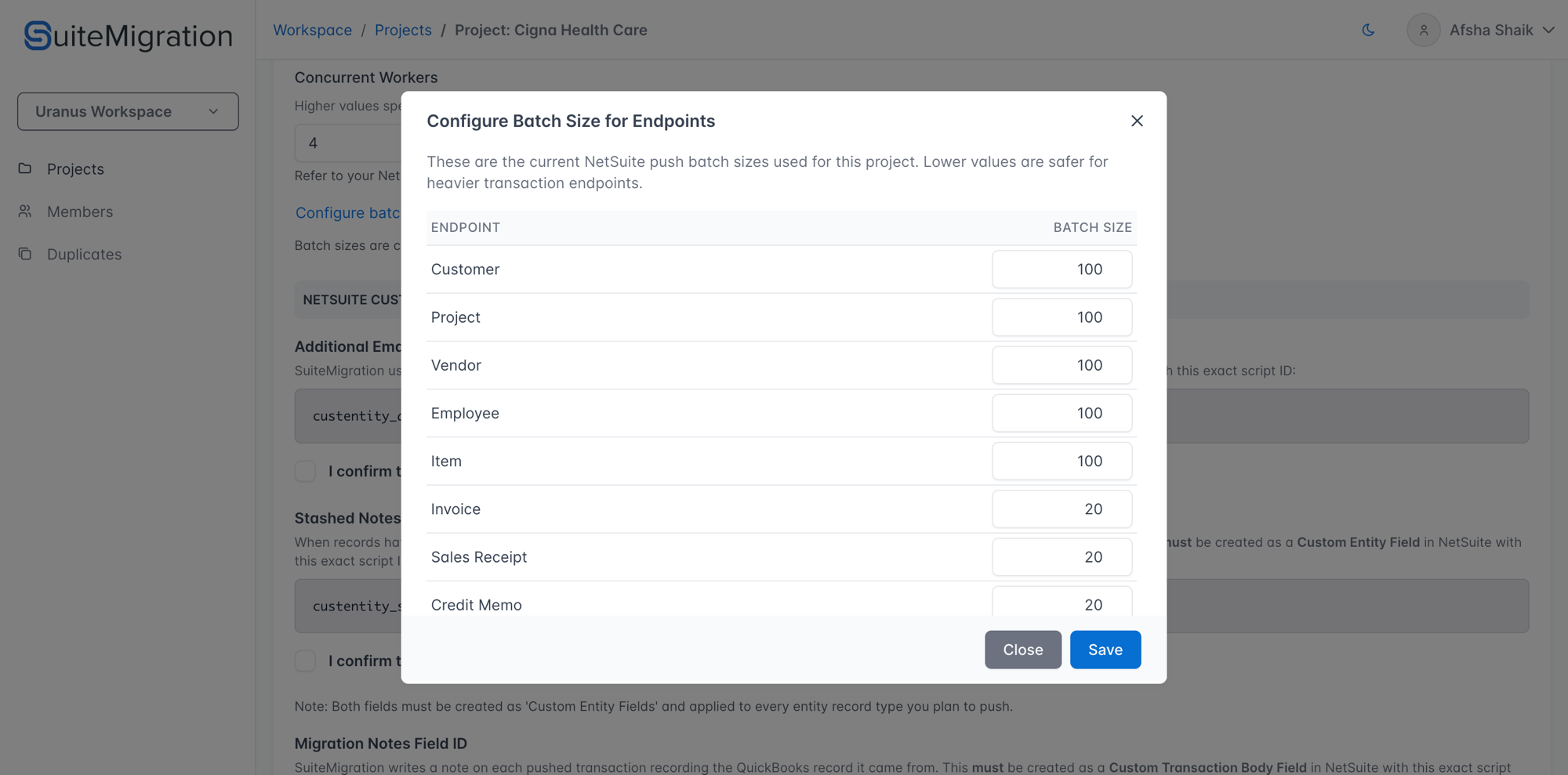
- Batch sizes are the number of records SuiteMigration sends per NetSuite request.
- Values are capped at 100 records per request.
- Lower values are safer for heavier transaction endpoints (invoices, bills, and so on).
Change the numbers as needed and click Save to persist the batch sizes for this Project.
NetSuite Custom Fields
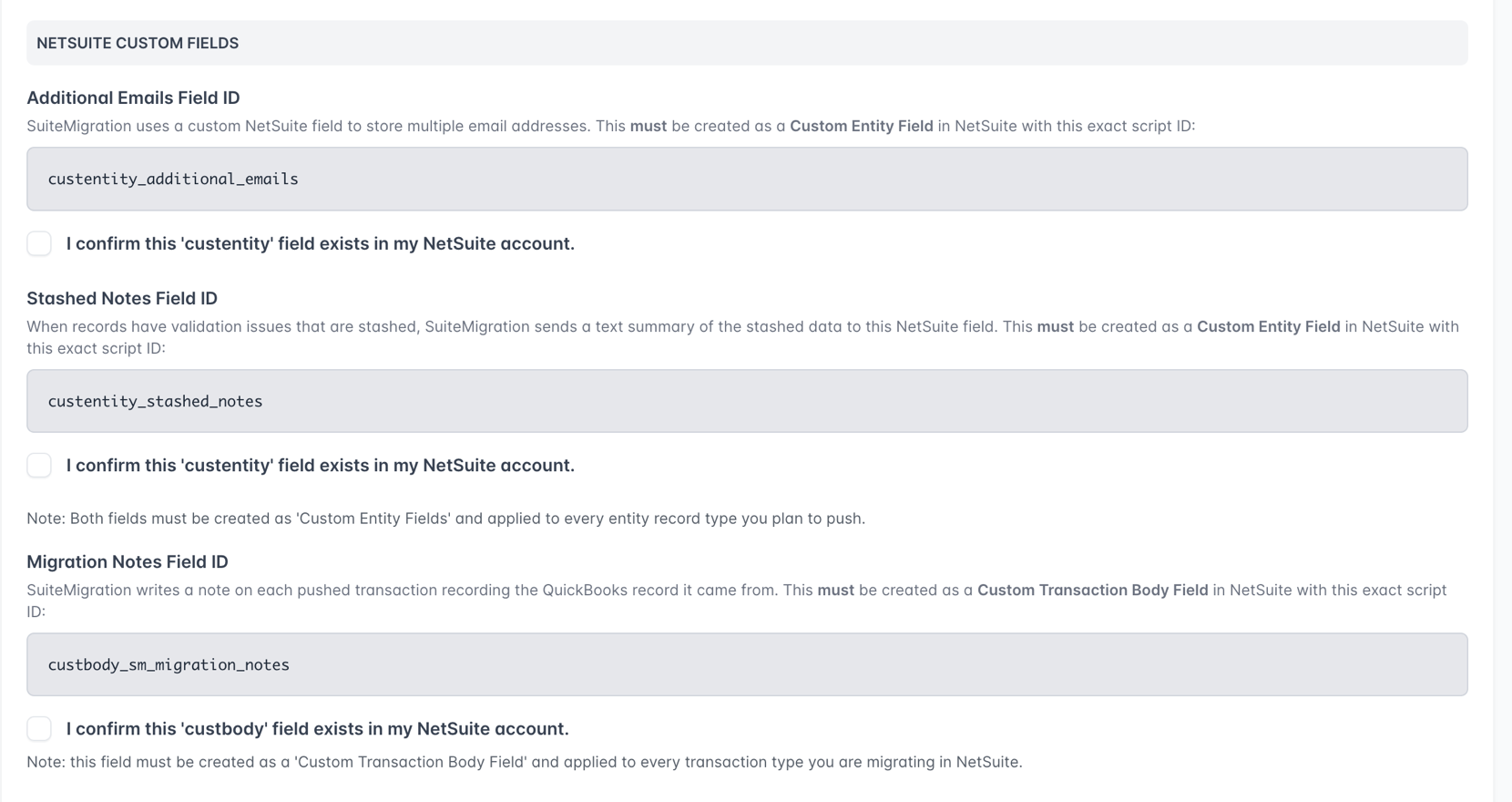
SuiteMigration needs a small set of custom fields in NetSuite. You create them in NetSuite once, then check the confirmation boxes here.
Both custom entity fields must be applied to every entity record type you plan to push (Customer, Vendor, Employee, and so on). The custom transaction body field must be applied to every transaction type you plan to migrate.
Additional Emails Field ID
A Custom Entity Field in NetSuite that stores multiple email addresses for an entity. Required script ID:
Check I confirm this 'custentity' field exists in my NetSuite account once you have created it.
Stashed Notes Field ID
A Custom Entity Field in NetSuite that stores a text summary of any validation issues that were stashed during push. Required script ID:
Check the confirmation box once you have created it.
Migration Notes Field ID
A Custom Transaction Body Field in NetSuite that records the source record each pushed transaction came from. Required script ID:
Check the confirmation box once you have created it.
Validation

Default A/R Account
The NetSuite Accounts Receivable account SuiteMigration uses when running the mixed A/R payment validation check.
- Only available once a NetSuite destination is connected and synced.
- The dropdown lists every A/R account pulled from the connected NetSuite subsidiary.
- Leave as Not set if you do not need mixed A/R validation.
Related article: Mixed A/R Account Rule.
Saving changes
Any change enables the Cancel and Save buttons at the bottom of the page. Click Save to persist. A success message appears once saved.