Deferred Status in the Push Results Report
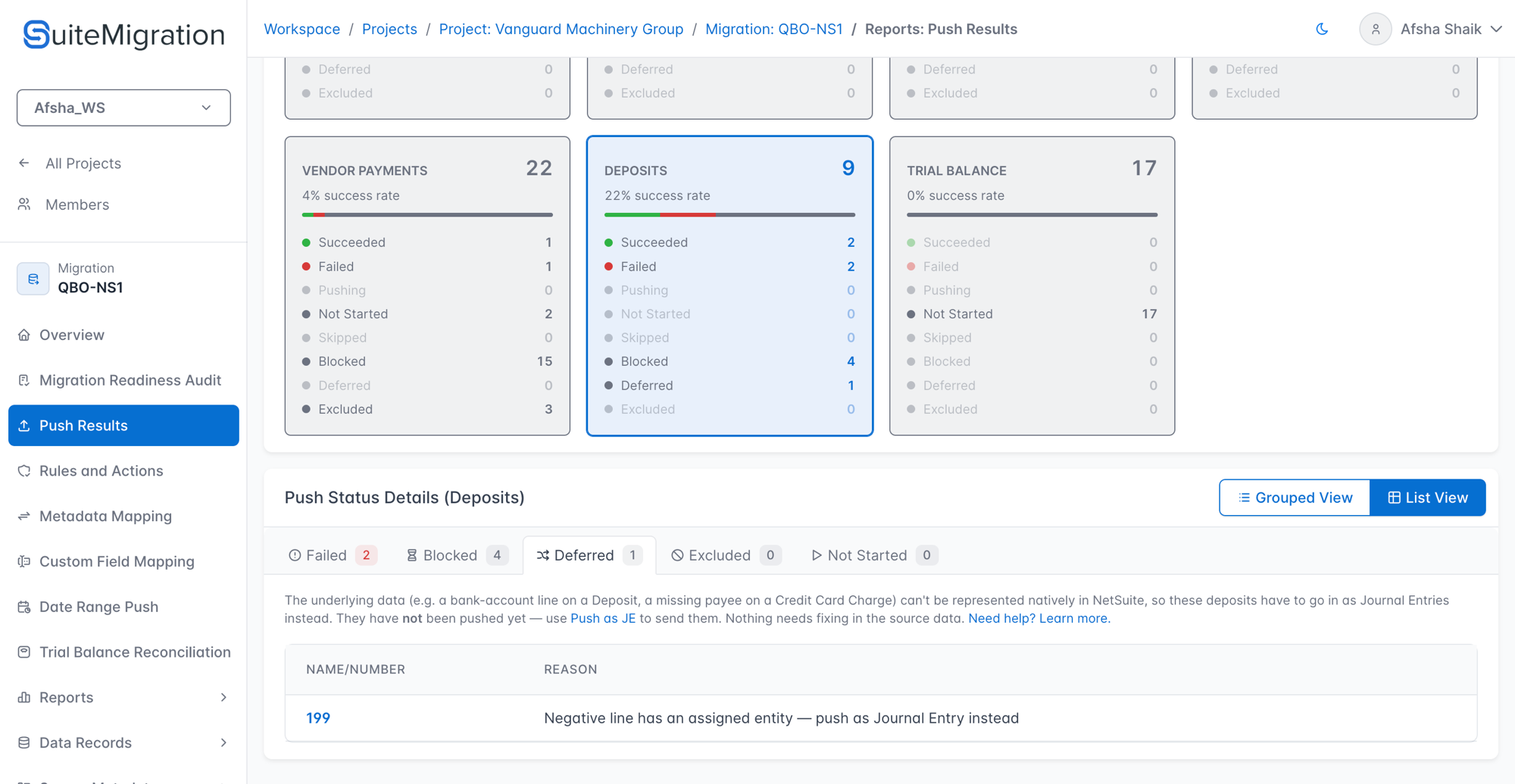
The Deferred tab in the Push Results report lists records whose shape can't be represented natively in NetSuite, so SuiteMigration will push them as Journal Entries instead. These aren't source-data mistakes to fix — they are legitimate transactions in QBO whose shape doesn't fit NetSuite's native form. Pushing them as a Journal Entry is the intended path.
Only five transaction types can be Deferred, because only these types have an "as Journal Entry" fallback push:
- Checks
- Credit Card Charges
- Credit Card Refunds
- Cash Expenses — push as a NetSuite Check natively, so they inherit the check's JE fallback
- Deposits
Deferred vs. Blocked vs. Excluded
The Push Results page's Status Guide panel spells out how the three "did not push natively" buckets differ:
| Status | Meaning | User action |
|---|---|---|
| Blocked | Waiting on a dependency to push first — e.g. a parent customer or line item that hasn't pushed yet. | None — resolves on the next push once the dependency lands. |
| Deferred | Can't be pushed as its own record type, but converts to a Journal Entry — waiting on the Push as JE action. | Push the record as a JE. |
| Excluded | Can't reach NetSuite by any route — neither the native push nor a Journal Entry works (e.g. category items, transactions without line items, project payees). | Fix the underlying data, or accept that the record cannot land in NetSuite. |
Records that have already been pushed as a Journal Entry are Succeeded, not Deferred — they are not listed on the Deferred tab. (See "When 'Already pushed as a Journal Entry' appears on the Deferred tab" below for the one edge case where they do appear here.)
Where to find Deferred records in the UI
The Push Results report offers two equivalent ways to focus on one entity type:
- Click a summary card. The report's Summary by Entity Type row shows a card per entity type (Customers, Vendors, Employees, Projects, Deposits, Checks, Credit Card Charges, and so on), each with a running count for Deferred alongside Succeeded, Failed, Blocked, and Excluded. Clicking a card scrolls the Push Status Details panel to that entity type.
- Pick from the top entity-type dropdown. The dropdown beside the date-range filter (labeled with the current entity, e.g. Deposits ▾) switches the details panel to any entity type in one click.
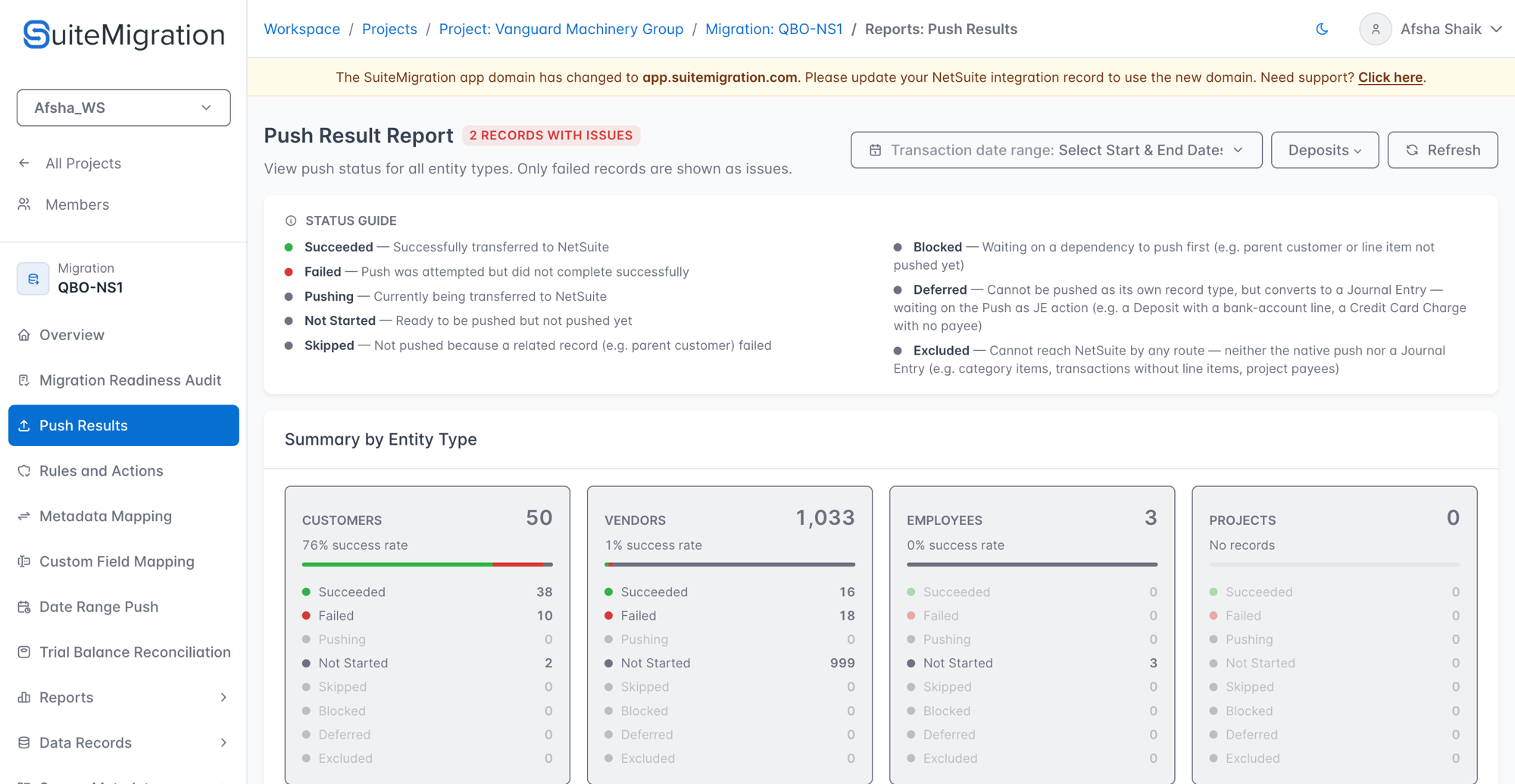
Once you're on the entity's Deferred tab, the Grouped View / List View toggle at the top-right of the Push Status Details panel controls how records are laid out:
- Grouped View — records collapsed under their reason string, with a per-group count. Good for scanning at a distance.
- List View — a flat Name / Reason table row per record. Good when you want to click through to individual records.
What triggers Deferred for each entity type
The reason string on each record names the specific NetSuite constraint that ruled out the native push. Every native-blocker reason in this section ends with " — push as Journal Entry instead" in the tab.
Checks
| Reason | What it means |
|---|---|
| No payee reference | The check has no payee. NetSuite's native Check form requires one. |
| Has an Accounts Payable line | One of the check's expense lines posts to an A/P account. NetSuite's native Check form doesn't allow A/P lines (those movements belong on bill payments or journal entries). |
Credit Card Charges
| Reason | What it means |
|---|---|
| No payee reference | The charge has no payee. NetSuite's native Credit Card Charge form requires one. |
| Payee is not a vendor | The charge has a payee, but the payee is a customer or employee. NetSuite's native Credit Card Charge form only accepts vendor payees. |
| Has an Accounts Payable, bank, or credit card line | One of the charge's lines posts to an A/P account, a bank account, or another credit-card account. NetSuite's native Credit Card Charge form allows only expense/other-charge lines on the body. |
Credit Card Refunds
| Reason | What it means |
|---|---|
| No payee reference | The refund has no payee. NetSuite's native Credit Card Refund form requires one. |
| Has an Accounts Payable, bank, or credit card line | One of the refund's lines posts to an A/P account, a bank account, or another credit-card account. Not allowed on a NetSuite Credit Card Refund's body. |
Cash Expenses
Cash expenses push as NetSuite Checks natively, so they inherit the same two triggers as Checks:
| Reason | What it means |
|---|---|
| No payee reference | The cash expense has no payee. NetSuite's Check form requires one. |
| Has an Accounts Payable line | One of the cash expense's lines posts to an A/P account. Not allowed on a NetSuite Check. |
Deposits
| Reason | What it means |
|---|---|
| Deposit-to account is not a bank account | The QBO deposit deposits into an account that isn't a bank account. NetSuite's native Deposit form requires a bank-type header account. |
| Has a bank-account line | One of the deposit lines posts to a bank account. NetSuite's native Deposit form only allows non-bank lines on the body (bank movements have to be journals). |
| Negative line has an assigned entity | The deposit has a negative-amount line that also carries a customer/vendor/employee reference. NetSuite's native Deposit form doesn't accept entity-tagged negative lines. |
Reasons you might expect on the Deferred tab but find under Blocked or Excluded
A Deferred record has a native-push problem and a working JE conversion. When the JE conversion is also broken, the record lands under Blocked (temporary — resolves when a dependency pushes) or Excluded (permanent) instead. The reason string describes why the JE fallback couldn't rescue the native failure.
If you're looking up one of the reason strings below, you found the right article — but the record is on the Blocked or Excluded tab for that entity type, not the Deferred tab.
On Checks and Cash Expenses:
| Reason | Category |
|---|---|
| "No valid line items" | Excluded |
| "Can't push natively — Item-backed lines cannot be represented on a Journal Entry" | Excluded |
| "A/P line has no entity for the Journal Entry line Name" | Excluded |
| "Payee not pushed yet" | Blocked |
| "Line-level customer/vendor not pushed yet" | Blocked |
On Credit Card Charges and Credit Card Refunds:
| Reason | Category |
|---|---|
| "No valid line items" | Excluded |
| "An Accounts Payable line has no customer/vendor" | Excluded |
| "Line item has no expense account" | Excluded |
| "Payee not pushed yet" | Blocked |
| "Line-level customer/vendor not pushed yet" | Blocked |
| "Line item(s) not pushed yet" | Blocked |
On Deposits:
| Reason (as shown in the report) | Category |
|---|---|
| "Can't push natively — Journal Entry conversion is disabled for deposits with linked payments/journal entries" | Excluded |
| "Can't push natively — Journal Entry conversion is disabled for deposits applied inside a customer payment" | Excluded |
| "Can't push natively — No Journal Entry-eligible lines" | Excluded |
| "Can't push natively — An A/R or A/P line has no customer/vendor" | Excluded |
| "Line-level customer/vendor not pushed yet" | Blocked |
When "Already pushed as a Journal Entry" appears on the Deferred tab
Normally, a record that has been pushed as a Journal Entry is Succeeded — it does not appear on the Deferred tab at all. The one exception is a record whose JE was created on an earlier run and whose push stage was later reset by a follow-up action on the source connection (for example, Resync Data, which re-arms rows for re-processing).
In that case, the row appears on the Deferred tab with the reason "Already pushed as a Journal Entry". The previously-created JE is still safely in NetSuite. Your options are:
- Leave it as-is — the existing JE remains in NetSuite; there is nothing that must be pushed again.
- Re-Push — open the entity's push-as-JE page (see the walkthrough below), switch to the Pushed tab, select the record, and click Re-Push Selected to send an updated JE reflecting the latest source data.
How to push a Deferred record
- Open the Push Results report for the migration.
- Focus on the entity type — click its summary card, or pick it from the top entity-type dropdown.
-
Click the Deferred tab in the Push Status Details panel.
-
Click the Push as JE link in the tab's intro paragraph. This opens the entity's dedicated push-as-JE page (e.g. Push Deposits as Journal Entries for deposits, Push Checks as Journal Entries for checks, and so on).
-
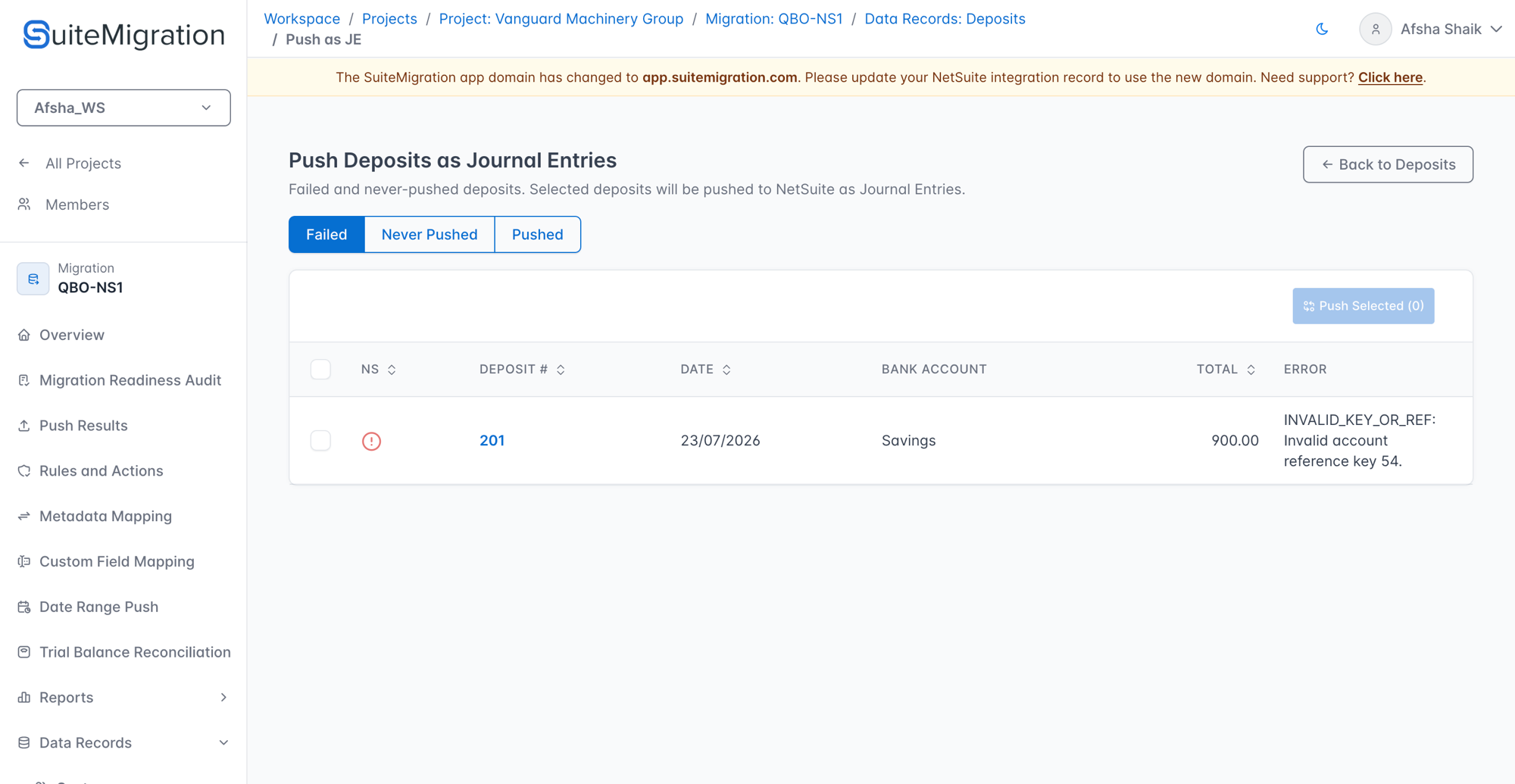
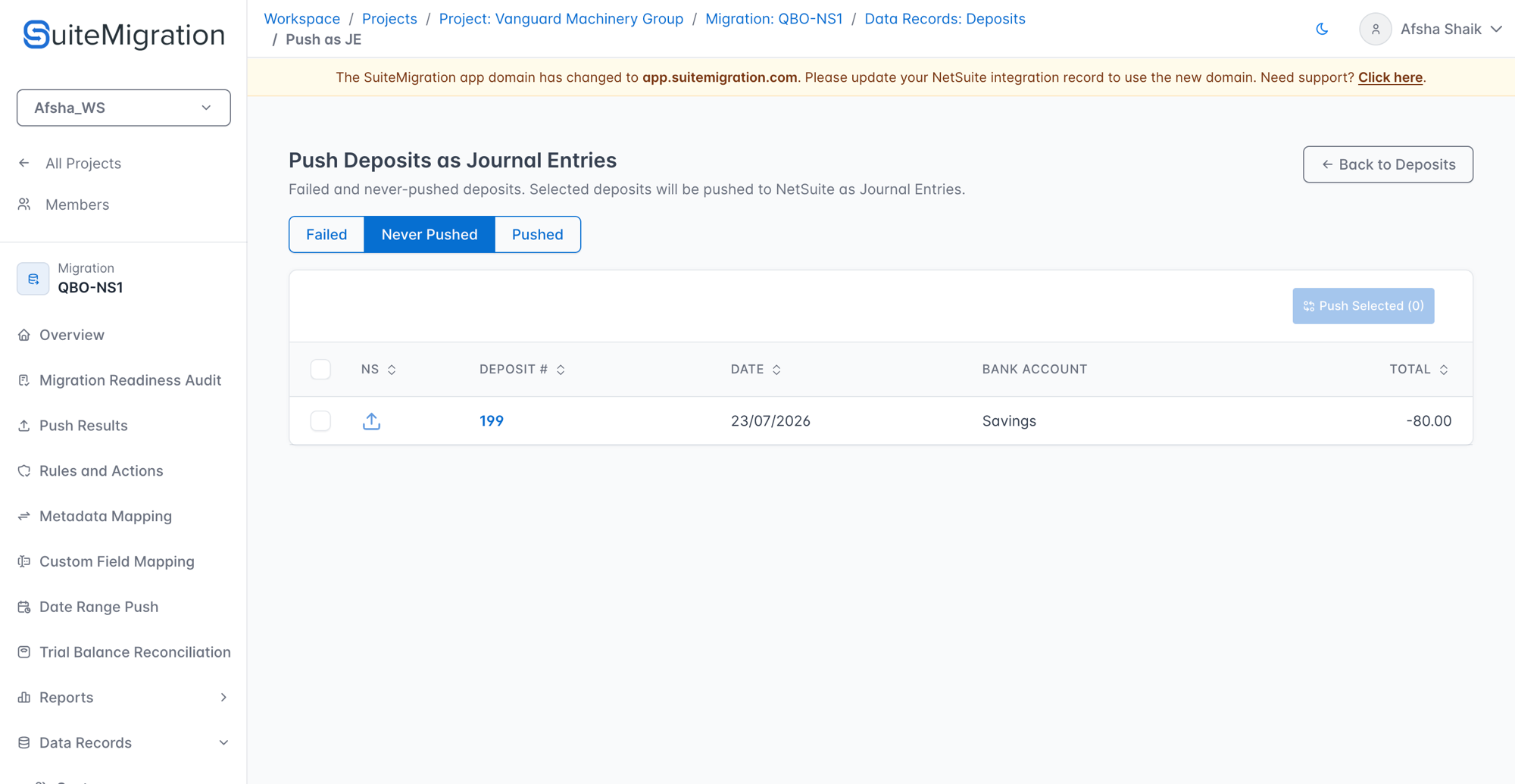
Pick the tab that matches the records you want to push:
-
Failed — a JE push was attempted for these records and failed (typically for a NetSuite-side reason like an invalid account reference — visible in the Error column). Fix the underlying issue, then push again from this tab.
-
Never Pushed — no JE push has been attempted yet. This is where most Deferred records start.
-
Pushed — the JE has already landed in NetSuite. The button on this tab becomes Re-Push Selected, which sends an updated JE reflecting the latest source data — useful after a source-side edit and resync.
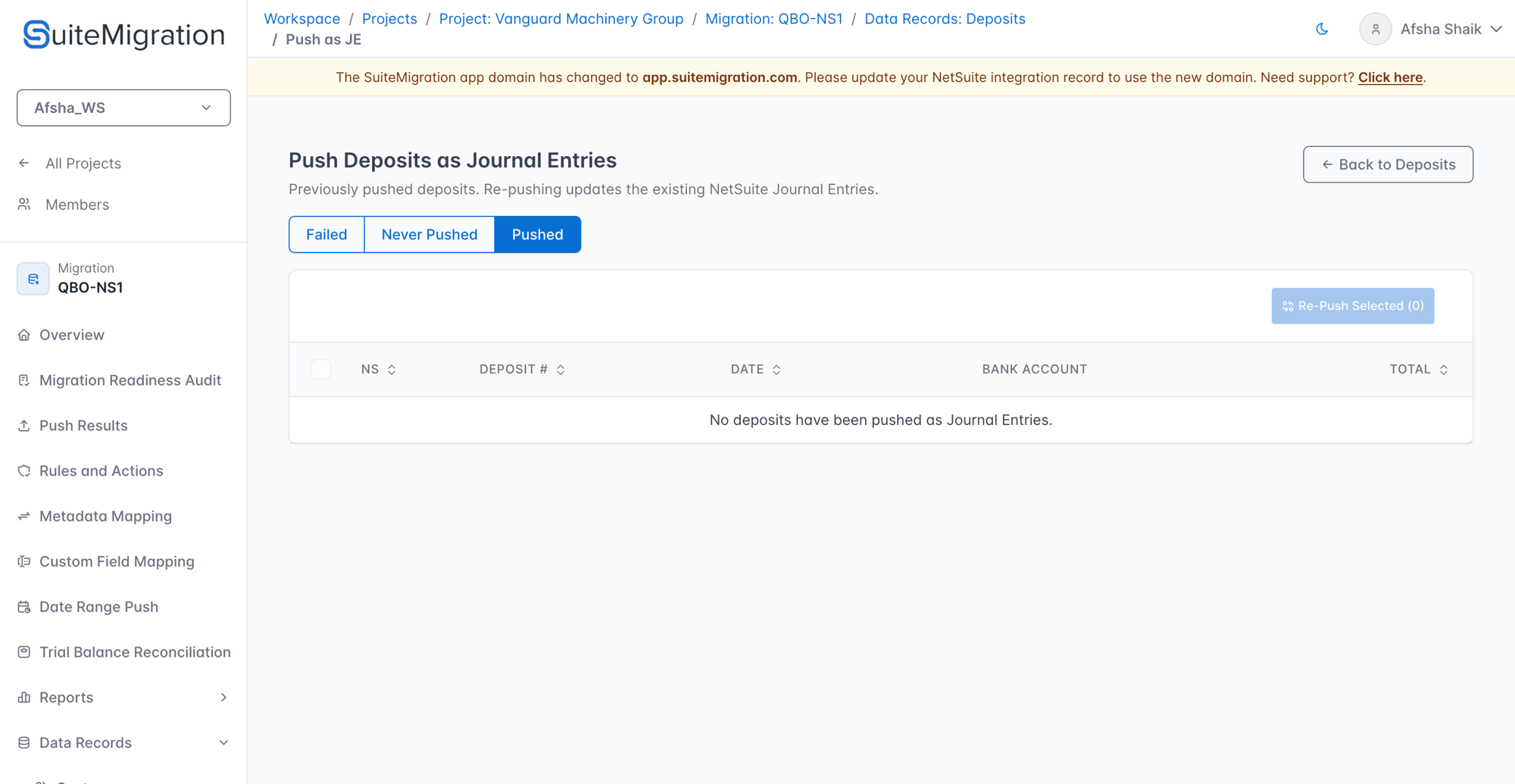 6. Select the records to push and click Push Selected (or Re-Push Selected on the Pushed tab). SuiteMigration converts each record into a Journal Entry — carrying the same debits, credits, and memo lines as the source transaction — and pushes it to NetSuite.
-
Once the push completes, the record's status on the Push Results report becomes Succeeded.